



Buick GMC Diagnostic Alerts – What are they?
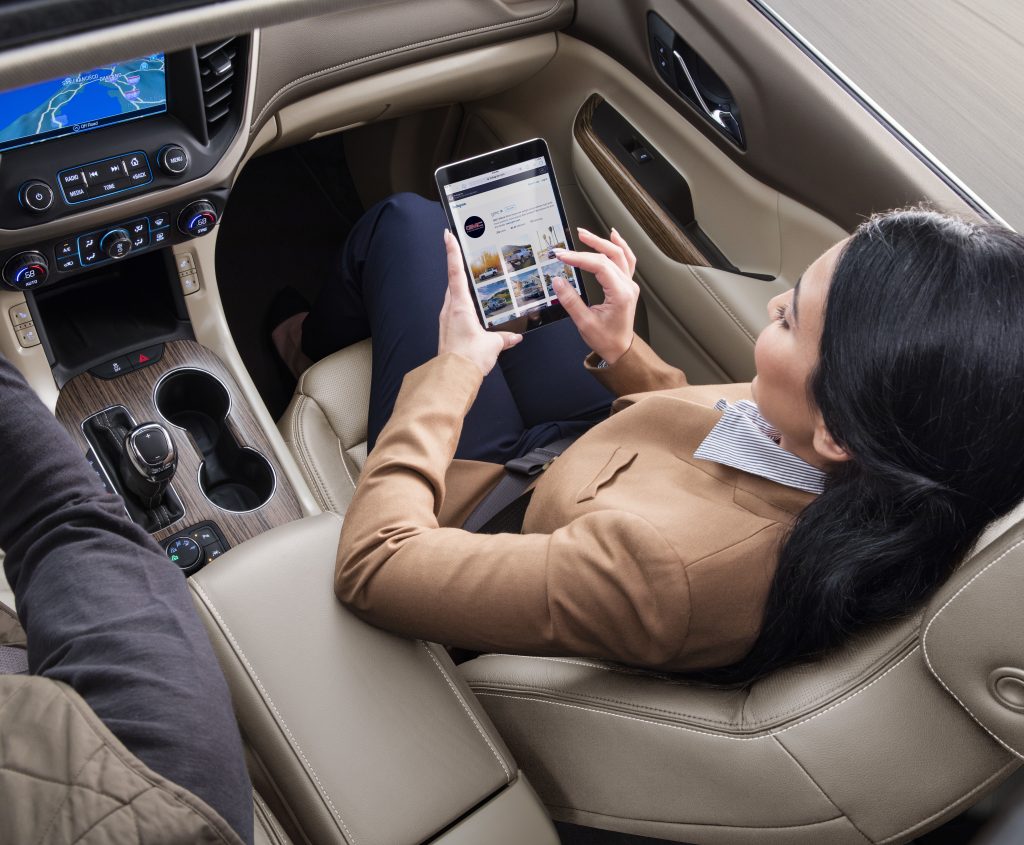
Diagnostic alerts on your Buick GMC are real-time notifications for key operating systems. They give you the confidence of knowing many of the things going on under your hood. After enrolling, you can keep tabs on the health of some of your vehicle’s key systems like the engine, transmission and anti-lock brakes. If a problem is detected, you can get a real-time alert by text message or email, depending on how you set your preferences.
Does my vehicle have this feature?
All 2018 or newer Buick GMC models are capable of receiving Diagnostic Alerts. You’ll also need an active OnStar plan to enroll.
How do I get started?
To receive Diagnostic Alerts you will need to enroll in the feature and set up your preferences for receiving alerts. You may have already enrolled in the program at the dealership when you originally purchased your Buick GMC.
If you did not enroll at the time of purchase, follow the steps below:
- Log into your GMC or Buick Account (www.gmc.com/myaccount or www.buick/myaccount)
- Navigate to the Vehicle Overview page, scroll down and select Notification Settings. Then, look for the Vehicle Diagnostics section under Communication Preferences.
- Toggle on Diagnostic Alerts for the notification method (Text/Email) that works best for you.
- You can also manage your notification preferences in the myGMC or myBuick mobile app.
- After enrolling, you’ll receive a confirmation text or email indicating you’ve successfully signed up.
For additional help you can contact your local Buick GMC Service Department.
Shortline Buick GMC
1301 So. Havana St.
Aurora, CO 80012
303-751-3400
https://www.ShortlineBuickGMC.com
Service Hours: Mon.-Fri. 7am-6pm; Sat. 8am-4pm
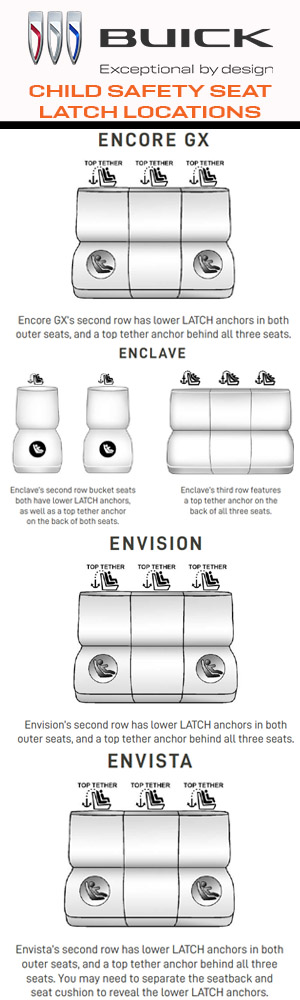
Shortline Buick wants to make sure you are aware of the safety features in your new Buick. Buick safety is important and locating the LATCH anchors in your new Buick will keep your child safely secured while driving. 46% of car seats and booster seats are used incorrectly according to a NHTSA Study. Please consult your Owner’s Manual or visit your local Buick dealership service department for help if needed. The Shortline Buick service team is available Mon.-Friday from 7am-6pm and from 8am-4pm on Saturday. Please come by 1301 So. Havana St. in Aurora, CO for assistance or information on the Buick safety features available to you in your Buick SUV/Crossover.
For directions to Shortline Buick please visit: https://www.shortlinebuickgmc.com/hours.aspx

Shortline Collision Center in Aurora | Denver will use GM OE Parts for your collision repair! GM designs and builds vehicles for performance, durability and safety. Insist on using GM OE parts engineered to fit your vehicle’s specific needs to help restore your GM to as close to its original, pre-collision condition as possible. Only GM Genuine Parts and ACDelco OE parts are designed, engineered, tested and backed by GM. Shortline has certified technicians trained to repair your Chevrolet, Cadillac, Buick, or GMC with GM Genuine Parts.
SHORTLINE COLLISION CENTER
1301 So. Havana Street, Aurora, CO 80012
303-306-4034
Mon.-Fri. 7am-6pm

Start with safety! Shortline Collision Center in Aurora | Denver promotes safe, proper auto repairs of GM vehicles. When the time comes to find a Denver metro collision repair center, is important to choose a facility that you can trust. The Shortline team is trained to repair dents, fix scratches, repair hail damage, and offer complete collision repairs when in an accident. When you visit Shortline you can rest assured knowing certified professionals addressing your vehicle are trained and specialized in your type of vehicle and are using the proper tools and equipment repair it. The technicians at Shortline are Certified to repair your vehicle.
SHORTLINE COLLISION CENTER
1301 So. Havana Street, Aurora, CO 80012
303-306-4034
Mon.-Fri. 7am-6pm
www.ShortlineCollisionCenter.com
360 Buick GMC Views are available
Choosing the color you want and the model you want can be an important decision in your vehicle buying process. Shortline Buick GMC tries to provide shoppers with 360 views of the vehicle available to purchase.
For example, click on the picture below of the new 2025 GMC Sierra 2500 HD AT4X to view 360 color palette.

As another example, take a look at the new Buick Envista Avenir 360 color palette.
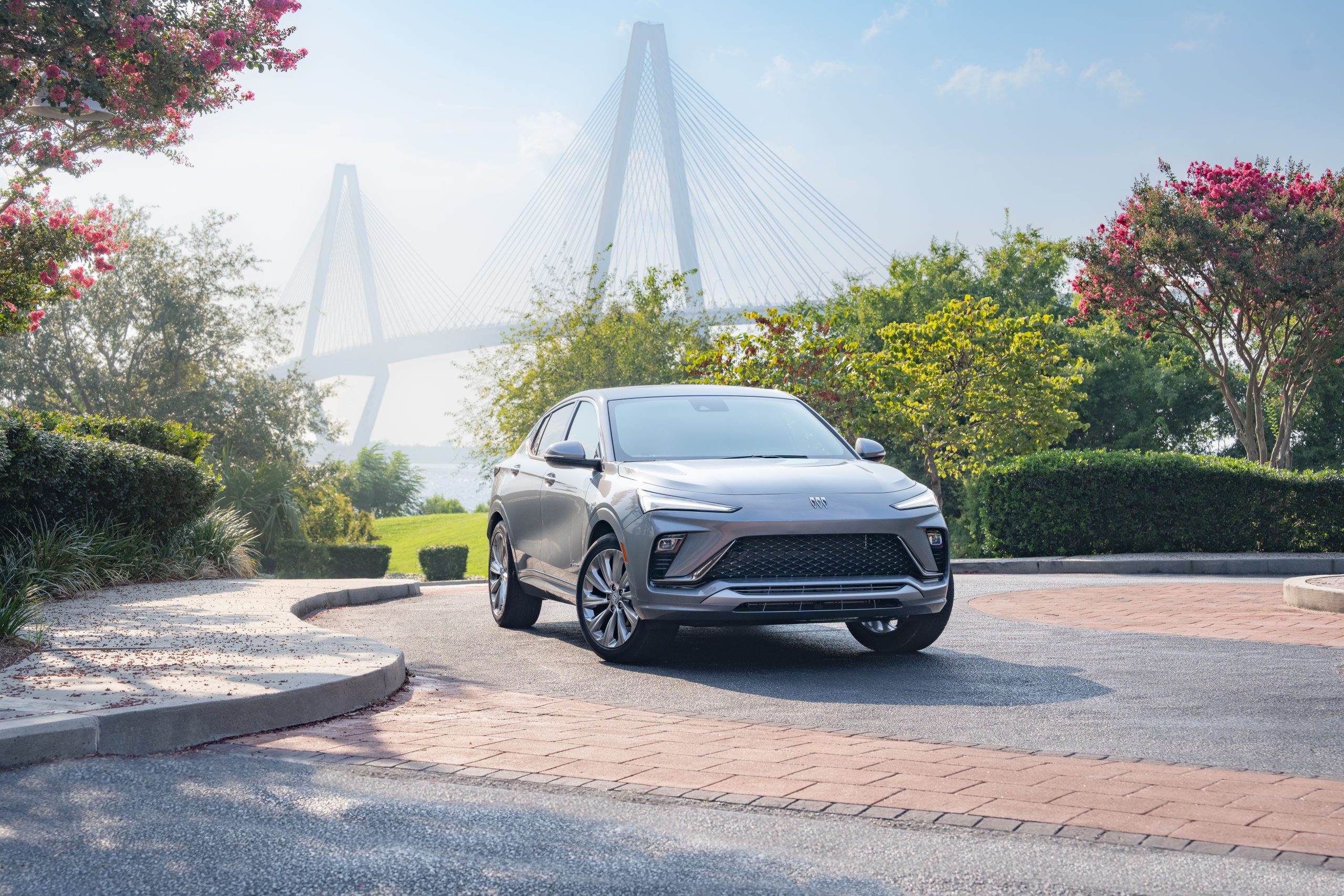
Visit the Shortline YouTube channel for additional 360 views and find the Buick GMC vehicle you want today at Shortline Buick GMC. Click to view the Shortline YouTube Channel now: https://www.youtube.com/channel/UC5qFqK6z3nJiLueIrcIVK6w
Find directions from Google to Shortline at: https://maps.app.goo.gl/MLAg2dVeLBBwe37H8
SET UP GOOGLE BUILT-IN"> SET UP GOOGLE BUILT-IN

IN 3 EASY STEPS
1. SIGN ON
The first time you use your vehicle’s touchscreen or create a new profile, the Setup Wizard will walk you through the steps of setting up and personalizing the system. During this process, you will be prompted to sign into your GM and Google Accounts.
While a Google Account is not required, it will offer a more personalized experience. Your vehicle must be in park to complete the setup.
2. REVIEW PERMISSIONS
The system will then ask you to accept or decline certain permissions. You can read more about each of these requests before accepting or declining. In some cases, declining permissions may prevent use of certain features.
3. ENJOY THE CONVENIENCE OF GOOGLE BUILT-IN
Use voice commands to do more with Google Assistant, get around with Google Maps, and download some of your favorite apps on Google Play.Try saying: “Hey Google, how’s the traffic to work?””Hey Google, set the temperature to 70 degrees” and much more.To use Google built-in and available In-Vehicle Apps at their full potential, push your blue OnStar button or talk with Shortline about purchasing a Connected Services plan.
LEARN MORE ABOUT GOOGLE BUILT-IN AT ONSTAR.COM/US/EN/SERVICES/CONNECTED-SERVICES
See onstar.com for details and limitations. Google built-in: Google built-in services are subject to limitations, and availability may vary by vehicle, infotainment system and location. Select service plan required. Certain Google actions and functionality may require account linking. User terms and privacy statements apply. Google, Google Play and Google Maps are trademarks of Google LLC. Super Cruise: Always pay attention while driving and when using Super Cruise. Do not use a hand-held device. Visit cadillac.com/supercruise for compatible roads and full details. In-Vehicle Apps: Available on select 2017 model year and newer GM vehicles with compatible hardware. Third-party trademarks are the property of their respective third-party owners and used under agreement. Requires active service plan and paid AT&T vehicle data plan. The marks of General Motors, its divisions, slogans, emblems, vehicle model names, vehicle body designs and other marks appearing in this advertisement are the trademarks and/or service marks of General Motors, its subsidiaries, affiliates or licensors. ©2021 General Motors. ©2021 OnStar LLC. All rights reserved.
How does GMC Super Cruise™ work?

The Super Cruise driver assistance technology uses precision LiDAR map data and in addition to real-time cameras, sensors and GPS to maintain control of the vehicle under certain conditions on compatible roads.
Additionally, Super Cruise is only available on compatible roads. Usually, these are roads separated from traffic going in the opposite direction.
The system works with Adaptive Cruise Control, which is designed to detect vehicles traveling in the same direction in its path and accelerate or brake the vehicle to maintain a driver-selected following gap time from a vehicle ahead, even in stop-and-go traffic conditions.
When engaged, Super Cruise utilizes a Driver Attention System. It provides feedback on system status, works to monitor your head and eye positioning and uses alerts that prompt you to pay close attention to the road and steer manually when needed.
HOW TO USE SUPER CRUISE
To use Super Cruise, Adaptive Cruise Control must be on.
1. Press the ADAPTIVE CRUISE CONTROL button on the steering wheel to turn the system on.
2. When Super Cruise detects you are on a compatible road for the feature to function are met (e.g., lane markings visible, GPS available, no system faults), the Super Cruise symbol illuminates on the instrument cluster.
3. When it is safe to do so, press the SUPER CRUISE button on the steering wheel. When the symbol and the steering wheel light bar illuminate in green, you may remove your hands from the steering wheel. You should not remove your hands from the steering wheel unless the light bar is green.
+ When all other driving conditions are met but you are not centered in your lane, the Super Cruise symbol will light up blue until you are centered in your lane.
4. If an Adaptive Cruise Control speed was not previously set, Super Cruise will set your current speed as the cruise speed.
5. When Super Cruise is turned on, it will activate the Enhanced Automatic Emergency Braking, Forward Collision Alert and Lane
Change Alert with Side Blind Zone Alert features, even if you had previously turned them off. When you turn Super Cruise off, these features will revert to the settings you had previously indicated for them.
Super Cruise is available to chose when you have an active eligible GM Connected Services plan.
Learn more from your Shortline GMC Associate at:1301 So. Havana St.Aurora, CO 80012303-751-3400
Also, you can visit Shortline online at https://www.ShortlineBuickGMC.com or shop for a new GMC now at https://www.shortlinebuickgmc.com/searchall.aspx?Make=GMC

When your car has been in a collision, getting it repaired properly is critical for your family’s safety and your peace of mind. But how do you know if a shop has the up-to-date knowledge to repair your vehicle safely?
The Gold Class designation lets you know a collision repair shop has trained technicians who know how to repair your vehicle properly. Approximately 20% of collision repair shops currently complete the rigorous training requirements needed to meet the Gold Class standard. Businesses that earn Gold Class status are proud of their accomplishment and will typically display the Gold Class logo prominently in their shop and on their website to help you identify them as highly trained repair facilities.
As vehicles incorporate more and more new materials and new technologies, current training has become increasingly important for proper repairs. Gold Class shops are trained to know:
- How to make the right decisions for a safe repair
- How to find hidden damage others may not see
- The latest repair procedures and technologies
- Which parts to repair and which to replace
Shortline Collision Center is your local I-Car Gold Class auto repair facility.
1301 So. Havana St., Aurora, CO 80012 303-306-4034
Visit the Shortline Collision Center online at https://shortlinecollisioncenter.com
Read about common FAQs for collision center customers at: https://www.shortlinecollisioncenter.com/FAQs
If you are shopping for a new Buick GMC visit: https://www.ShortlineBuickGMC.com
HAVE QUESTIONS ABOUT RESERVING A GMC HUMMER EV?

HUMMER EV RESERVATIONS:
Q: WHAT IS A GMC HUMMER EV RESERVATION?
A: The reservation gets you one step closer to owning a HUMMER EV by securing your place in line to submit a vehicle purchase order. When we reach your place in line for your selected configuration, you will be contacted by your selected dealer to complete and submit your purchase order, which is expected to occur several months before your scheduled vehicle production date.
Q: IS THE RESERVATION FEE REFUNDABLE?
A: Yes, your fee is refundable if you cancel your reservation prior to completing and submitting your purchase order. You may cancel your reservation by contacting your selected dealer or by calling 833-HUMMER-EV. After your cancellation request is approved, please allow up to 7 business days for refunds to be processed.
Q: HOW DO I RESERVE A GMC HUMMER EV?
A: Reserve yours today through the online reservation process. The simple process will walk you through four easy steps: choose your trim, choose your participating dealer, enter your information, and confirm your reservation agreement. Limitations may apply.
Q: NO DEALERS ARE SHOWING UP WHEN I ENTER MY ZIP CODE. ARE THERE NO DEALERS IN MY AREA?
A: Please make sure you are you hitting the “View Dealers” button. Doing so will populate a list of your closest participating dealers. HUMMER EV Reservations are available only in the 48 Continental United States and Hawaii.
Q: I COMPLETED MY GMC HUMMER EV RESERVATION. WHAT’S NEXT?
A: Your selected dealer will contact you when it is time to order your vehicle. At that time, you will complete a purchase order at your chosen dealer, which confirms your order details such as the model year, color, trim options, price of your vehicle, and an estimated delivery date.
Q: DID MY GMC HUMMER EV RESERVATION GO THROUGH?
A: If you were directed to a “Thank You” web page after submitting your reservation then your reservation was successfully submitted. You will also receive a Reservation confirmation email within 48 hours.
H-EV FAQ | 10/20/20
Q: WHERE AM I IN LINE?
A: Reservations are stored sequentially in the order they were received. Your reservation will be fulfilled based on availability of your chosen configuration and vehicle production, which begins in Fall 2021. Vehicle production schedule is dependent upon numerous variables, including trim and option selections. Your selected GMC HUMMER EV dealer will contact you to provide delivery detail timing once your vehicle is ready to be built. Specific details regarding vehicle production timelines are not currently available at this time.
Q: WHEN WILL I GET MY GMC HUMMER EV?
A: GMC expects HUMMER EV production to begin Fall 2021. When your vehicle is about to be produced you will place your purchase order with your selected dealer and receive approximate timing for delivery.
Q: IF EDITION 1 RESERVATIONS ARE FULL, HOW DO I GET ON THE WAITLIST FOR EDITION 1?
A: To get on the Edition 1 waitlist, you will need to reserve another GMC HUMMER EV trim and check the “Edition 1 Waitlist” box on Step 3, Reservation Agreement. You will then be contacted if/when an Edition 1 production slot becomes available.
Q: WHERE IS MY GMC HUMMER EV RESERVATION CONFIRMATION EMAIL?
A: It will take up to 48 hours to receive your HUMMER EV reservation confirmation email.
Q: WHERE CAN I GET A COPY OF MY RESERVATION AGREEMENT?
A: Your reservation agreement is available and can be printed or saved at the end of the online reservation process. If you did not save or print your reservation agreement at the time you submitted your online reservation, you may contact your dealer for a copy of your reservation agreement.
Q: WHERE CAN I FIND MY RESERVATION ID?
A: Your Reservation ID can be found on the Thank You web page and in your reservation confirmation email. If you cannot locate it, please contact 833-HUMMER-EV.
HUMMER EV PRODUCT:
Q: WHAT IS THE PRICE/MSRP?
A: The starting at MSRP varies by trims. For more information please view the GMC HUMMER EV trim details. The Manufacturer’s Suggested Retail Price excludes, tax, title, license, dealer fees and optional equipment.
H-EV FAQ | 10/20/20
Q: WHAT IS THE HORSEPOWER AND TORQUE?
A: Edition 1 offers a GM-estimated 1,000 hp and a GM-estimated 11,500 lb-ft. of torque. For additional trim level specs, please click here.
Q: HOW FAST IS THE EDITION 1 GMC HUMMER EV?
A: Edition 1 will offer a GM-estimated 0-60 mph in approximately 3 seconds in Watts to Freedom Mode. Information for other trims will be provided closer to start of production.
Q: HOW MANY MOTORS DOES THE GMC HUMMER EV HAVE?
A: 2 or 3-motor e4WD drive systems will be available, depending on vehicle trim. For more information please view the GMC HUMMER EV trim details.
Q: HOW MANY SEATS WILL THE VEHICLE HAVE?
A: The HUMMER EV has a seating capacity of 5.
Q: WHEN IS THE SUV BEING REVEALED?
A: Information is not available at this time. Sign up for the latest information on GMC HUMMER EV including future SUV announcements.
Q: WHEN IS THE SUV AVAILABLE?
A: Information is not available at this time. Sign up for the latest information on GMC HUMMER EV including future SUV announcements.
ELECTRIC VEHICLE CHARGING:
Q: HOW CAN I FINE CHARGING STATIONS IN MY LOCAL AREA?
A: The availability of public charging has increased substantially over the past few years. GMC HUMMER EV works with the available myGMC Mobile App with Energy Assist features (active service plan required) allows you the access to the following functionality:
Check Range in a Glance
Find Real-Time Charging Station Availability
Click to Charge. This is not payment, it is the ability to start a charging session with a “click” from within Energy Assist.
Plan Your Route
Wireless projection via Apple or Android Devices.
Q: WHERE CAN I CHARGE AN ELECTRIC VEHICLE?
A: For the average commuter, the vast majority of charging happens at home (overnight, similar to your smartphones). For the times when you need to charge outside of the home, there are currently about 70,000 public charging outlets in the US and this number is growing every day.
H-EV FAQ | 10/20/20
Q: HOW LONG DOES IT TAKE TO CHARGE AN ELECTRIC VEHICLE IN GENERAL?
A: Charging times will vary depending on charging type and vehicle specs. There are three levels of charging:
AC Level 1 charging can deliver 2 to 4 miles of range per hour (at home use)
AC Level 2 charging can deliver 7 to 40 miles of range per hour (at home use / at work)
o Range per hour varies depending upon the type of charger used (3kW to 19kW)
DC fast charging can deliver 60 to 100 miles of range in 10 minutes (public use)
o Range per hour varies depending upon the type of charger used (24kW to 350kW)
Q: WHAT TYPE OF CHARGING CORD COMES STANDARD WITH THE VEHICLE?
A: It will offer a dual cord set that is capable of charging either Level 1 (120v) or Level 2 (240v).
ELECTRIC VEHICLE BENEFITS:
Q: HOW WILL I KNOW IF AN ELECTRIC VEHICLE IS RIGHT FOR ME?
A: If performance, reduced environmental impact, convenience, and reduced operating costs versus conventional vehicles are important purchase factors, then electric vehicles should be at the top of your shopping list. Owning an electric vehicle has never been more compelling.
Q: DO I NEED TO DO ANYTHING TO MY HOUSE TO BE READY FOR OWNING AN EV?
A: In order to charge an EV, you simply need access to a household outlet (120 Volt, 3 prong). If you wish to charge at faster speeds you may consider upgrading to a Level 2 charging station. GMC is working with Qmerit to help with the process of installation at home from a qualified electrician. More information to come at a later date.
Q: ARE THERE ANY OTHER BENEFITS OF OWNING AN EV?
A: EV propulsion can be nearly silent and EVs can offer attractive performance attributes (e.g., acceleration and handling). Additionally, EVs benefit from reduced operating costs when considering energy, maintenance, and repairs. There may also be federal, state, and local EV incentives available. Finally, EV customers may benefit from HOV lane access in many parts of the country.
Shortline Buick-GMC is the local Denver Metro area approved GMC Hummer EV dealer.
1301 So. Havana St. Aurora, CO 80012
303-751-3400
Visit Shortline GMC online today to shop for a new GMC at: www.ShortlineBuickGMC.com
Visit our map to find directions to Shortline GMC at: https://maps.app.goo.gl/5q7o1FkJtSxNgtrZ6

The available Hands-Free Power Liftgate with Logo Projection and Programmable Height (if equipped) lets you open and close the
liftgate with a simple kicking motion below the bumper. If equipped, an illuminated logo will be projected on the ground underneath
the location of where you should kick.
DOES MY VEHICLE HAVE THIS FEATURE?
- If you have the HANDS-FREE CUSTOMIZATION MENU on your infotainment system, your vehicle has Hands-Free Power Liftgate
- If you have a knob on the inside of your driver door or overhead console that shows an open liftgate with various heights, you have Hands-Free Power Liftgate
- If your liftgate opens when you kick under the bumper, you have this feature
HOW IT WORKS
Using sensors positioned below the rear bumper, the power liftgate is designed to open or close when you kick up toward the bumper in a straight kicking motion. On some models, a logo projects on the ground to show you where to kick. If your vehicle does not have the logo projection, check your vehicle Owner’s Manual for the correct location to kick.
- The logo projection (if equipped) turns on automatically as you approach within six feet of the rear of the vehicle and stays illuminated for 60 seconds
- In order to operate the Hands-Free Power Liftgate, your key fob must be within three feet of the rear of the vehicle. It can be in your hand, pocket or in a bag (only the key fobs received at vehicle delivery will activate the logo projection feature)
- You should aim your kick over the logo that is projected on the ground (if equipped), but don’t step on the logo
- Your kick should be in and back out in one quick, straight motion, taking only about one second. Your kick should be high enough to come within five inches of the bottom of the bumper without kicking the vehicle
- A side-to-side motion of your foot will not work, nor will holding your foot under the bumper. Your foot must pass through the range of light beam sensors, which may require you to adjust the height of you leg swing
- The same kicking motion opens and closes the liftgate
- When closing the liftgate, there is a two-second delay before it starts closing to give you time to step away from the moving liftgate
- The taillamps will flash and a chime will sound to indicate the liftgate is opening or closing
Get your personal demonstration of the hands-free power liftgate on your new Buick at:
SHORTLINE BUICK-GMC
1301 So. Havana St.
303-751-3400
Visit your local Shortline Buick showroom at : Shortline Buick GMC Service
Find directions to Shortline Buick at: https://maps.app.goo.gl/5q7o1FkJtSxNgtrZ6
Connect with us


